


SkyTrak® Golf Simulator | Standard Studio
A complete, budget-friendly studio built for golfers who want high-quality simulation without unnecessary extras.
The SkyTrak Standard Studio delivers everything you need to build a reliable, high-performance indoor hitting bay—minus the launch monitor—making it a perfect choice for players who want to customize their simulator setup while keeping costs efficient. Whether you're practicing in a spare room, basement, or garage, this studio provides dependable construction, crisp visuals, and a realistic hitting surface.
What’s Included
Sturdy Enclosure, Impact Screen & Aluminum Frame
A durable, easy-to-assemble enclosure engineered to contain full-speed shots safely. The high-impact stretch screen offers clear projection quality and a clean, professional look.
5×5 True-Turf Hitting Mat
Built for comfort and performance, this mat provides a realistic turf feel that holds up to all swing types while remaining soft enough for extended sessions.
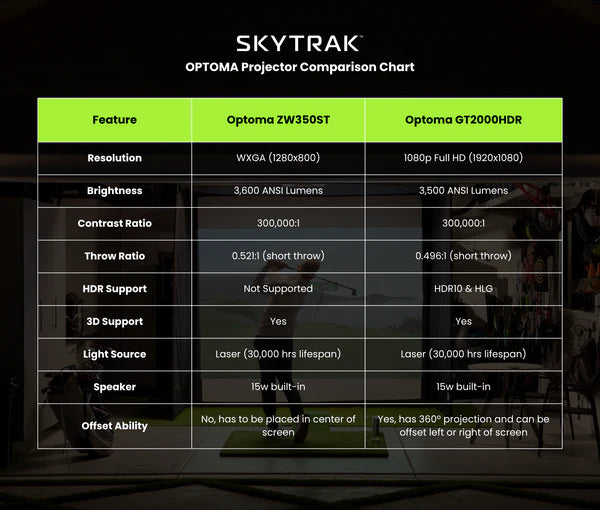
ZW350ST Short-Throw Projector
A reliable, value-focused projector delivering crisp, bright simulator visuals at an affordable price point. Ideal for golfers who want clarity without the premium cost.
Protective Floor Projector Mount (Included with 8′ Studios)
The 8′ configuration uses a secure, low-profile floor mount for the projector—perfect for low-ceiling rooms or garage setups.
Key Features
-
Complete indoor golf studio setup — just add your preferred launch monitor
-
Sturdy enclosure with high-impact stretch screen
-
Durable aluminum frame designed for fast, easy assembly
-
5×5 true-turf hitting mat with realistic feel and cushioned support
-
Bright, crisp ZW350ST short-throw projector included
-
Protective floor projector mount included with 8′ studios
-
Multiple size options: 8′, 10′, 12′, and 13′ Deep
-
Floor-mounted projector option for low ceilings (8′ studio)
-
Clean, ceiling-mounted projection for larger studios (10′–13′ models)
-
Ideal for basements, garages, spare rooms, and multi-use spaces
-
Compatible with all major launch monitors (SkyTrak, Uneekor, Garmin, Foresight, Bushnell, FlightScope)
-
Safe, contained design suitable for full-speed indoor shots
-
Great value without sacrificing image quality or durability
Choose the Perfect Studio Size
Available in four size options, the Standard Studio adapts to a wide range of indoor spaces:
-
8 ft
-
10 ft
-
12 ft
-
13 ft (Deep)
Projector Setup Based on Size
-
8′ Studio – Floor Mounted Projector
Ideal for low ceilings or garages. No ceiling installation required. -
10′, 12′ & 13′ Studios – Ceiling Mounted Projector
Cleaner, overhead projection for larger rooms with standard ceiling height.
Why Choose the Standard Studio?
-
Most affordable SkyTrak studio option
-
Clean, simple design with everything you need to start simulating
-
High-impact screen + true-turf mat = realistic practice experience
-
Perfect for multi-use rooms, basements, and compact spaces
-
Works with any launch monitor, letting you build your ideal setup
Best For
Golfers who want a complete enclosure + screen + projector package at the best value, with the freedom to add the launch monitor and software of their choice.
Setup Requirements
Setup Requirements
Creating the perfect golf simulator space starts with understanding the room requirements for your SkyTrak Studio. Please review the enclosure dimensions, swing clearance recommendations, and system requirements below before purchasing.
Room & Enclosure Requirements
To ensure a safe and comfortable playing experience, confirm that your space has enough width, depth, and ceiling height for the enclosure and a full golf swing.
Studio Enclosure Dimensions
-
Studio 8: 8 ft (W) × 7 ft 5 in (H) × 4 ft (D)
-
Studio 10: 10 ft (W) × 8 ft 6 in (H) × 5 ft 4 in (D)
-
Studio 12: 12 ft (W) × 8 ft 6 in (H) × 5 ft 4 in (D)
-
Studio 13 Deep: 13 ft (W) × 10 ft (H) × 10 ft (D)
Important: Even if the studio fits your room on paper, always take a few practice swings in your intended hitting area to confirm you have enough clearance for your full motion.
System Requirements
Your simulator software must run on a compatible device. Below are the minimum and recommended specifications for smooth performance.
Minimum Specs (Windows)
-
Internet: Broadband connection
-
OS: Windows 7 (32-bit or 64-bit)
-
Processor: Intel Core i3 or better
-
RAM: 4 GB
-
Graphics: NVIDIA GTX 670 or AMD 7850 (2 GB VRAM or better)
iOS Compatibility
-
iPad Pro (Gen 1 or newer)
-
iPad Air (2019 or newer)
-
iPhone 8 or newer
Recommended Specs (Windows)
For best performance with high-end simulation:
-
OS: Windows 10 (64-bit)
-
Processor: Intel Core i7
-
RAM: 8 GB
-
Graphics: NVIDIA GTX 1650 / AMD Radeon 580
-
DirectX: Version 11
-
Storage: 128 GB SSD
-
Internet: Broadband connection
macOS / iPadOS Requirements
All Apple devices must have an M1 chip or newer
(e.g., MacBook Pro, iPad Pro).
Shipping & Returns
Golf Sim Masters offers free shipping on all SkyTrak Studio orders within the continental United States.
SkyTrak Hardware Return Policy
To receive refund credit on SkyTrak hardware products:
Return Conditions
-
Must be returned within 30 days of purchase
-
Must include all original packaging and components
-
Must show no visible wear or damage
Restocking Fees
-
Items not meeting the above criteria may incur a restocking fee up to 40%
-
Launch monitors or projectors showing wear or damage may incur a 40% restocking fee
-
Customers are responsible for return shipping
Processing
Please allow up to 14 business days after delivery to SkyTrak for return inspection and refund processing.
Non-Returnable Items
-
Studio packages
-
Accessories
-
Custom setups
-
Simulation services
-
Software and subscription products
-
Orders shipped outside North America
-
Laptops & tablets (manufacturer warranty only)
Products Damaged on Arrival
Inspect your shipment immediately upon delivery.
-
Damage must be noted with the freight carrier at the time of delivery
-
Provide photo evidence to Golf Sim Masters within 24 hours
-
Replacement products will be shipped at no additional cost for verified cases
Items damaged after use are only eligible for replacement if covered under warranty.
SkyTrak Warranty Information
1-Year Warranty on Studio Enclosures
Covers defects in materials and workmanship.
Impact Screen Care (Important)
The screen is a consumable item. To maximize its lifespan:
-
Use clean, unmarked golf balls
-
Avoid balls with ink, cuts, scuffs, or sharp imperfections
-
Install the Velcro border protection on all screen edges before use
Failure to install screen border protection voids the warranty.
Warranty Covers
-
Defective materials
-
Poor workmanship
-
Items damaged or incomplete out of the box
Warranty Does NOT Cover
-
Normal wear and tear
-
Snags, abrasions, pulled threads
-
Damage from misuse or improper setup
-
Damage from hitting the enclosure with anything other than a golf ball
-
Cleaning and maintenance issues
-
Individually sold accessories (nets, mats, ball trays, projectors)
Return Address
All approved returns must be sent to: